
How To Disable The Pop-Up Blocker In Mozilla Firefox

Usually, Firefox blocks pop-ups by default, so you need to disable the function to see the pop-ups. Read on to learn how to disable the blocker on your PC, iPad, and iPhone.
Disable Pop-Up Blocker on Firefox on PC.
- Launch Firefox.
- Click the top horizontal lines.
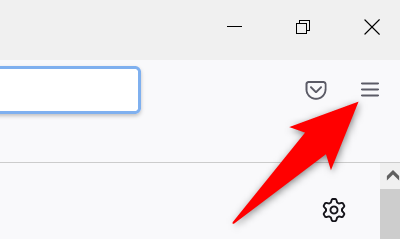
3. Select ‘Settings.”
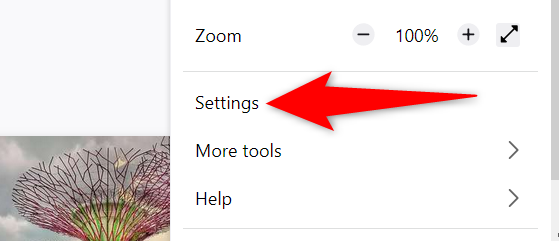
4. Open “Privacy & Security”
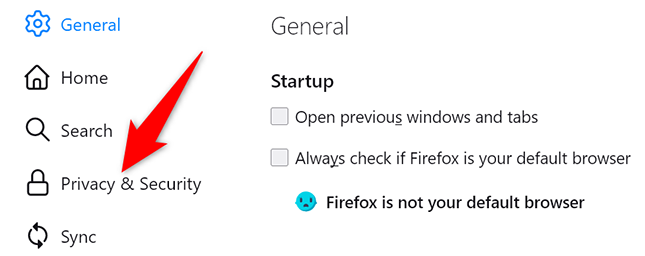
5. Scroll down the right pane and find “Permissions.”
6. Locate and uncheck the “Block Pop-Up Windows” option at the bottom.
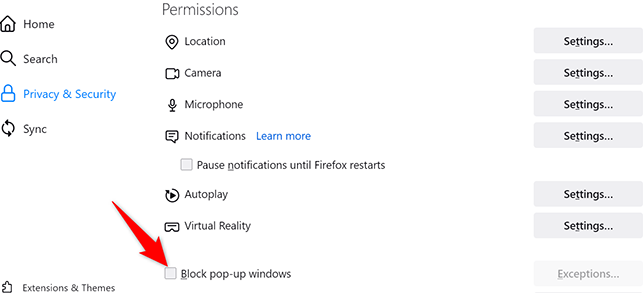
Now the Pop-Up blocker is disabled.
Disable Pop-Up Blocker on iPad and iPhone
- Launch Firefox.
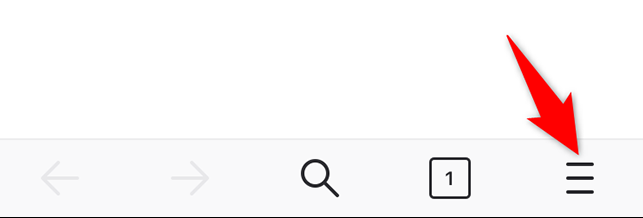
- Tap the three horizontal lines at the bottom right.
3. Click “Settings.”

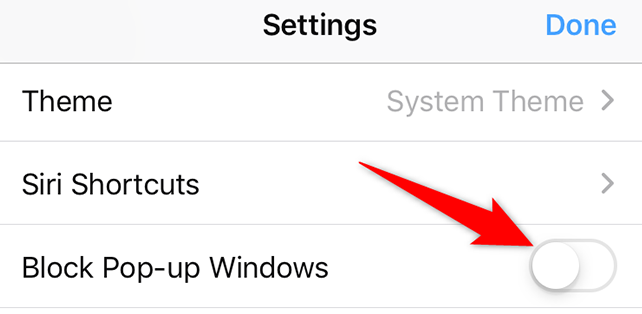
4. Toggle the “Block Pop-Up Windows” option.
Now you’re all set.