
USB Cable Working Principle and Technical Innovation: A Friendly Guide to Modern Connectivity
Understanding USB and Its Functionality
USB is a key technology for connecting devices to computers. It has changed a lot over the years, with faster speeds and new connector types. Let’s look at how USB works and why it’s so useful.
The Evolution of USB Standards
USB 1.0 came out in 1996. It was slow, moving data at just 1.5 Mbps. USB 1.1 fixed some issues and bumped speeds to 12 Mbps.
USB 2.0 arrived in 2000. It was a big jump, hitting 480 Mbps. This made it great for things like external hard drives.
USB 3.0 showed up in 2008. It reached 5 Gbps, perfect for moving large files fast. USB 3.1 and 3.2 pushed speeds even higher.
The latest is USB4. It can move data at up to 40 Gbps. That’s fast enough to run multiple 4K displays at once.
The Universal Serial Bus System
USB uses a “host-peripheral” setup. Your computer is the host, and devices like mice or printers are peripherals.
When you plug in a USB device, the host spots it right away. It figures out what the device is and how to talk to it.
USB also provides power. That’s why you can charge your phone just by plugging it into your laptop.
The system uses four wires. Two carry data, and two provide power. USB 3.0 and up add more wires for faster data transfer.
USB Connectors and Ports
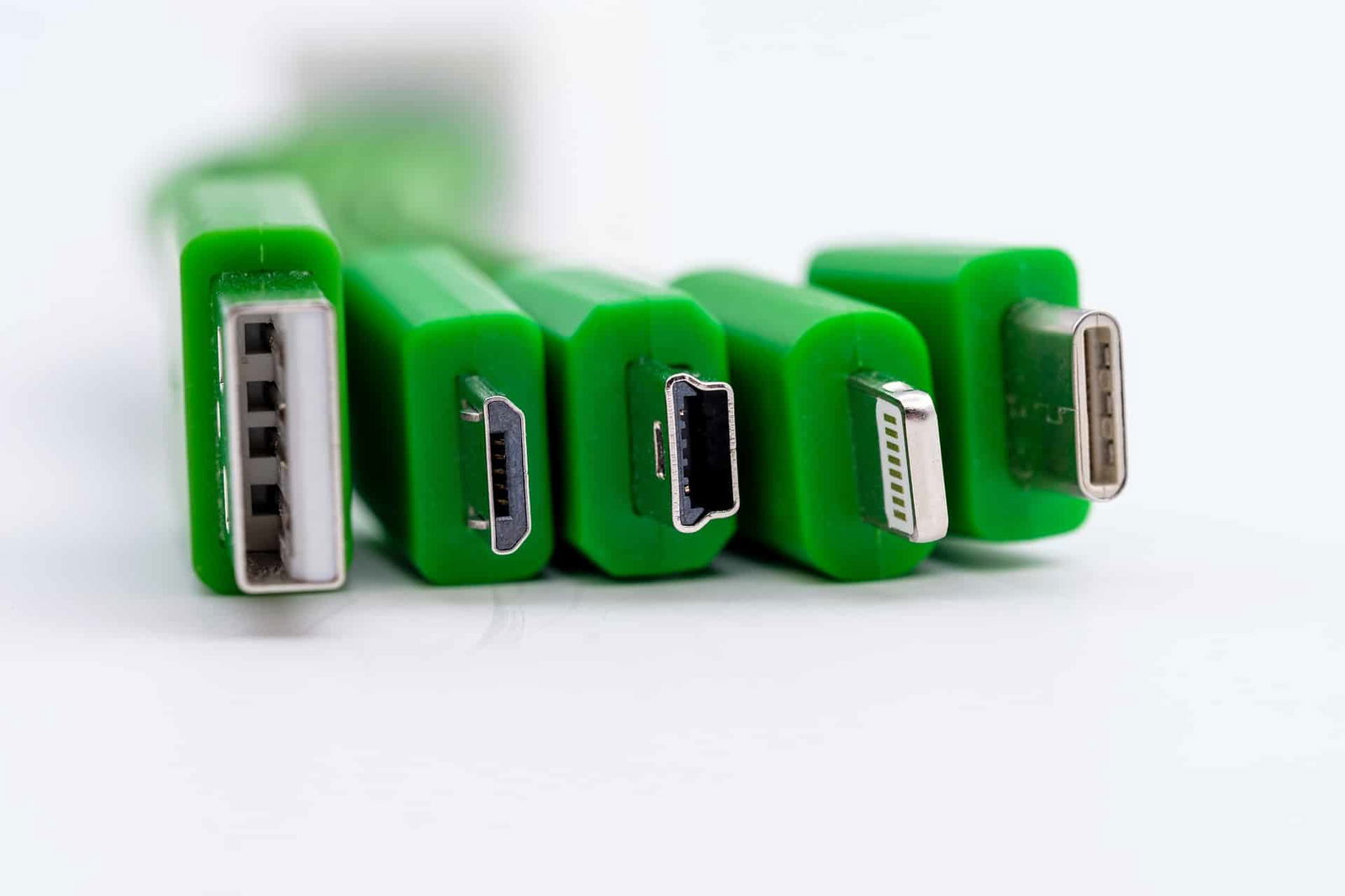
USB has several connector types. The most common are:
- Type-A: The flat, rectangular plug you know well
- Type-B: A square plug often used for printers
- Type-C: The newest, small, and reversible
Type-A is found on most computers. It’s been around since the start of USB.
Type-B is less common now. You might see it on older printers or hard drives.
Type-C is becoming the new standard. It’s small, can be plugged in either way up, and supports the fastest speeds.
Many devices now use Type-C on both ends of the cable. This makes connections simpler and more flexible.
USB Cable Technology and Data Transfer
USB cables move data between devices fast and easily. They use special wires and rules to send information quickly and safely.
How USB Cables Facilitate Data Transmission
USB cables have special wires inside to carry data. They have power wires too. The main data wires are twisted together. This helps stop outside noise from messing up the signal.
USB 2.0 cables have four wires total. Two are for power, and two are for data. USB 3.0 added more wires. This lets it send data both ways at once.
The cable sends data as electrical signals. These signals follow rules set by USB protocols. This makes sure devices can talk to each other correctly.
Bandwidth and Data Transfer Speeds
USB cables have gotten much faster over time. The first USB could send 12 megabits per second. USB 2.0 bumped this up to 480 megabits per second.
USB 3.0 made a big jump. It can send up to 5 gigabits per second. That’s about 10 times faster than USB 2.0.
Here’s a quick look at USB speeds:
- USB 1.0: 12 Mbps
- USB 2.0: 480 Mbps
- USB 3.0: 5 Gbps
- USB 3.1: 10 Gbps
- USB 3.2: 20 Gbps
Newer versions can move more data at once. This helps with big files like videos or backups.
USB Protocols and Communication Systems
USB uses a “host-device” system. The host (like your computer) controls the connection. Devices (like your phone) respond to the host’s commands.
The USB protocol handles how data is packaged and sent. It makes sure data gets where it needs to go safely.
USB also has ways to check for errors. If something goes wrong, it can try again. This helps keep your data safe.
The protocol can work with many types of devices. It can handle keyboards, phones, hard drives, and more. This flexibility is why USB is so popular.
Power Delivery and Charging via USB
USB has become a key technology for charging devices and managing power. It allows you to charge phones, tablets, laptops and more from a single cable. The latest USB standards bring big improvements in charging speed and power output.
USB in Device Charging and Power Management
USB ports can now deliver much more power than before. Old USB 2.0 ports gave just 2.5 watts. New USB Power Delivery ports can supply up to 100 watts. This lets you charge bigger devices like laptops.
USB-C cables make charging easier. They work in any direction when you plug them in. Many new phones and laptops now use USB-C ports for charging.
Smart power management is built into USB. Devices “talk” to chargers to get the right amount of power. This keeps your gadgets safe from getting too much current.
The Role of USB in Power Delivery
USB Power Delivery (USB PD) is a big upgrade for charging. It lets devices ask for more power when needed. Your phone might draw 7.5 watts normally, then jump to 18 watts for fast charging.
USB PD uses higher voltages to send more power. It can go up to 20 volts, much higher than the usual 5 volts. This means less heat and power loss in the cable.
Chargers and devices negotiate the best power level. They pick from several options: 5V, 9V, 15V, or 20V. This flexible system works for many types of gadgets.
Advancements in Battery Charging Standards
New USB standards keep making charging better. USB PD 3.0 added more power levels for smoother charging. It also brought improved safety features.
The latest USB PD 3.1 can deliver a huge 240 watts of power. This is enough for gaming laptops and other power-hungry devices. You’ll need special cables rated for this high power, though.
Fast charging keeps getting quicker. Some phones can now charge fully in under 30 minutes using USB PD. Battery life is getting better too, with smarter charging that preserves battery health.
USB Compatibility and Connectivity
USB cables connect many devices to computers and other electronics. They let you plug in keyboards, printers, phones, and more. USB hubs expand connectivity options.
USB Compatibility with Devices and Peripherals
USB works with lots of devices. You can plug in keyboards, mice, printers, and flash drives to your computer. Smartphones and tablets also use USB to charge and transfer files.
Most USB devices work with PCs, Macs, and laptops. Newer USB versions are backwards compatible. This means your old USB 2.0 mouse will still work in a new USB 3.0 port.
Some devices need specific USB versions for full speed. A USB 3.0 hard drive may work slower in a USB 2.0 port.
Enhancing Productivity with USB Hubs
USB hubs let you connect more devices to your computer. They’re great when you run out of USB ports.
A hub turns one USB port into many. You can plug in your mouse, keyboard, and printer all at once. Some hubs also charge your devices.
Powered hubs are best for devices that need extra juice. They’re good for hard drives and other power-hungry gadgets.
USB hubs come in different sizes. Small ones are perfect for travel. Larger hubs work well on desks with many devices.
The Impact of USB on Device Connectivity
USB has made connecting devices much easier. Before USB, devices often needed their own special ports.
Now, one USB cable type fits many gadgets. This makes it simple to use new devices with your computer.
USB has also improved data transfer speeds. Newer versions like USB 3.0 and 3.1 are much faster than old ones.
Charging devices is easier with USB too. Many smartphones and tablets charge through USB ports. This means fewer chargers to carry around.
USB-C is becoming more common. It’s reversible, so you can’t plug it in wrong. It also supports faster speeds and more power.
The Innovators Behind USB Technology
USB technology came from the hard work of many people and companies. Let’s look at who created USB and how they worked together to make it happen.
Key Figures and Organizations in USB Development
Ajay Bhatt led the team at Intel that came up with USB. He wanted to make plugging in devices easier for everyone. Intel joined forces with other big tech companies to create USB.
Microsoft, Apple, IBM, Compaq, NEC, and Nortel all played important roles. These companies formed a group called the USB Implementers Forum. They worked on making USB a standard that all computers could use.
How Collaborative Innovation Shaped USB
Working together was key to USB’s success. The tech companies shared ideas and solved problems as a team. This teamwork helped them create a plug that worked with many devices.
You might wonder why so many companies joined forces. They knew that having one standard would make things easier for you and other users. It also meant that more devices could work together. The group kept improving USB over time. They made it faster and able to do more things. This team effort is why you can easily plug in so many devices to your computer today.